
Money
The team's prices, plans, charges and payments. Everything on this page is done by both the treasurer and the admin. What a member sees (balance, paying) is described on the Member page.
Start here
You set everything up in the team settings (the “Settings” link to the right of the team name):
- The currency in the “Prices and plans” section (Prices).
- The training price in the same section. It cannot be left empty; 0 = free.
- The payment details, so that members know where to pay (Payment details).
- Plans, if the team offers monthly subscriptions or packs (Plans).
Prices
Set prices in the team settings → “Prices and plans”. Both the treasurer and the admin can edit them. Every team member sees the training price and all the plans on offer; only the treasurer and the admin see other people's individual prices.
Currency: the team keeps its money in one currency (PLN, EUR, CZK or UAH). You can change it until the team has its first charge or payment; then it is fixed.
Prices: the training price (paid by everyone without a plan or an individual price), the suggested season fee and the season's name, e.g. “2026/2027”. Zero is a normal price; it means “free”. An empty field means “not set”.
An admin can set a training its own price (e.g. a more expensive hall). Which price applies to one training:
- the person's individual price, if they have one (Setting a member's plan),
- otherwise the training's own price,
- otherwise the team's training price.
Trainings beyond a pack are paid at the training's price, otherwise at the team's price. If there is no price anywhere, the app does not silently charge zero; it shows that a price has to be set.
A training or a match with its own price of 0 is free for everyone, also for people with an individual price, and uses no training of a pack.
How charges are created
Automatically:
- per training: when an admin or you close attendance (Taking attendance), it is charged to everyone present whose training is not covered by a plan: whoever has no plan, whoever has an individual per-training price and whoever has already used up their pack. A zero price creates no charge. If nobody closes the attendance by 10:00 the next day, the treasurers and admins get a reminder (“Attendance not closed”),
- subscription: on the first day of the month (in the morning) to everyone on a monthly subscription, even if they never come. The month's first trainings are covered by the pack, further ones are paid as single trainings. A subscription with a price of 0 creates no charge,
- whoever leaves the team still pays the subscription for the month in which they left, then no more,
- a suspended member pays the same. If you do not want them to pay the subscription, change their plan to “Per training at the team price” from that month; the app cancels the subscription.
Manually:
- season fee (Season fee),
- a charge or a credit with a description: on the member's page (tap them in the team list) “Add a charge or credit”. A credit lowers the member's debt without any money coming in (a discount, compensation for a cancelled month). Money the member really handed over is recorded with “Add a payment”, so it counts as money received.
- the same charge to several people (e.g. 10 zł each for jerseys): in “Settlements”, “Charge several members…”. Write a description and an amount; everyone is ticked with the same amount, change it for someone or untick them (e.g. the coach). Each person gets a manual charge, which you can cancel one by one.
You see all of a member's charges on their page. A manual charge and a season fee can be cancelled (the “Cancel” button): the app adds a correction with the opposite sign (“Correction: …”). You do not cancel training and subscription charges manually: they follow from attendance and plans, so you correct the attendance or the plan and the app recalculates the rest by itself.
When charges are recalculated
The app recalculates the charges in a month by itself and settles the differences with corrections. It deletes nothing.
- Recalculated: a change of a member's plan (also retroactive), a change of a plan's price, a change of a training's own price, cancelling or restoring a training, correcting attendance.
- Not recalculated: a change of the team's training price. The new price applies only to trainings charged from now on; those already charged stay at the old price.
- A cancelled training is never charged, not even to those marked as present.
Example: Michał came 6 times without a plan at 30 zł, a debt of 180 zł. On 20 October you give him a 4-pack (100 zł) for October. The app cancels 4 training charges, adds the pack and leaves the 2 trainings beyond the pack at the team price. The debt drops to 160 zł. The history shows every correction; nothing disappears.
Season fee
Set the amount and the season's name in “Prices and plans”. Then:
- In “Settlements”, in the “Season fee” panel, tap “Bill the season…”.
- In the list of members with the amount from the settings, change someone's amount (e.g. half for someone who came in the middle of the season) or untick them.
- Confirm. Whoever already has the fee for this season shows “billed 200 zł” and is not billed a second time.
For a single person, e.g. someone who joined later, use the “Season fee 2026/2027: not billed · Bill” row on their page. The amount is pre-filled and you can change it.
Plans
Plans are the team's monthly subscriptions, e.g. “Open · 250 zł / month”, “8-pack · 180 zł / month”, “4-pack · 100 zł / month”. A plan has a monthly price and a number of trainings per month (empty = unlimited); a plan with a number of trainings is a pack. Whoever uses up their pack pays further trainings as single ones (at the training's or the team's price). Unused trainings expire at the end of the month. You do not delete a plan, you retire it: it is no longer offered, and whoever has it keeps paying the same.
Whoever has no plan pays the team's price for every training. Set a different price (e.g. the coach for free, a student 20 zł per training) for a particular person as “Individual”.
Setting a member's plan
On the team page tap a person in the members list. You see what they pay now and the whole history. The line at the top says it is the person's profile in this team: the plan, balance and payments there apply to this team only. “Change plan”:
- Choose the month: the next one by default; at most 3 months ahead or back (adding a pack on the 20th for the whole month is normal).
- Choose a plan from the list, “Individual” or “Per training at the team price” (end of the plan).
- With “Individual”, choose “Monthly subscription” (your own monthly price and number of trainings) or “Per training” (your own training price). An empty training price means the training's or the team's price, 0 = free.
- Add a note, e.g. “coach, free”.
Assigning a plan copies its prices to the person. The previous period ends at the end of the previous month. If you change a plan retroactively, the app recalculates all months from that month until today and settles the differences with corrections.
If the person already has a change from that month or later, delete it first. “Remove the last change” deletes the latest period, if it starts at most 3 months back; the previous one then continues.
Plan choice for the month
Instead of asking everyone which plan they want, you can ask members to choose themselves. Settlements has a “Plan choice” section at the top. The team page shows it too, under the balance; there the next month is offered from 5 days before the end of the current one until you open it.
- “Open the plan choice for …”: the current or the next month. Select the plans to choose from and whether “Per training” (at the team price) is allowed too. Set the deadline (e.g. 3 November, inclusive); until then members choose and pay.
- Members get a notification, and the team page shows a “Choose your plan for …” card. If their current plan is on offer, it is already selected, so confirming it is enough; until the deadline they can change their choice. Whoever has an individual per-training price (e.g. the coach for free) is not asked.
- The section shows for everyone what they pay this month, split into “Not chosen yet” (after the deadline “Did not choose”), “Chosen” and “Individual price, not asked”. “Remind” sends a reminder to everyone who has not chosen yet; the day before the deadline the app reminds them by itself. A group of more than 5 people is shown as avatars; “Show all” opens it.
- You have “Change” next to everyone except those with an individual price, at any time. While the choice is open, members change their choice themselves too; after the deadline only you can.
A plan is bought for each month separately: whoever does not answer by the deadline loses their plan for that month and pays per training.
The choice is an ordinary plan change from the 1st of the month: a pack is charged straight away if the month has already started, otherwise on the 1st of the month.
If you open the choice for the current month, the subscription was already charged on the 1st. Whoever does not answer or chooses “Per training” gets the subscription cancelled by the app after the deadline and their trainings charged one by one. The exception: a plan you set for them yourself from this month stays.
If “Per training” is not on offer, a person without a plan cannot sign up for that month's trainings themselves (the list says “no plan, cannot sign up”) until someone chooses a plan for them; an admin can always sign them up.
The app never opens the choice by itself: on the 1st of the month it only reminds the treasurer (and if the team has no treasurer, the admins) if the team has plans and the choice for that month is not open (Settlements then also shows a banner during the first week of the month).
Changing a plan's price
You edit the plan and change the price. The app asks “New prices from” and tells you how many people it affects. The next month is the default; you can choose at most 3 months back or ahead.
- Whoever has the plan from before the chosen month pays the old price until the end of the previous month and the new one from the chosen month; their history shows two periods.
- Whoever has the plan from the chosen month or later simply gets the new price.
Just renaming it recalculates nothing.
Payment details
In the team settings (section “Payment details”, both the treasurer and the admin can fill it in) you tick the ways members can pay. A ticked way shows a field for its detail:
| Way to pay | You fill in | The member sees |
|---|---|---|
| Cash | nothing | whom to give it to (the recipient), and they report the cash like any other payment |
| BLIK | phone number | the number to copy |
| Phone payment | phone number | the number to copy (instant payment to a mobile number) |
| Bank transfer | IBAN (or a Polish account number, 26 digits) | the account to copy |
| PAY by square | IBAN | a QR code for Slovak bank apps, with the amount and payment title filled in |
| QR Platba | IBAN | a QR code for Czech bank apps, with the amount and payment title filled in |
| Revolut | your Revtag (e.g. @jan, or the revolut.me link) | a button that opens Revolut |
The app checks the phone numbers, account numbers and Revtags. When you tick PAY by square or QR Platba, it fills in the account you already entered. Whatever you do not tick is not offered to members. The Recipient (the account holder or whoever takes the cash) is shown with every way to pay.
The app suggests the payment title to the member by itself: the team's name and their first and last name (e.g. “Żubry Kraków Jan Kowalski”), so the statement shows straight away who paid. Only team members see the details, never people with an invite link.
When the treasurer changes, an admin changes the role. The payment details are not deleted, so the new treasurer should replace the “Payment details” with their own right away. Balances belong to the team, not to the treasurer.
Settlements
A person's balance in the team is their confirmed payments minus charges, together with all their earlier memberships in this team. A reported payment does not change it until you confirm it. An overpayment carries over. More in the member's guide.
You also see members' debts straight away on the team page, in the list on the Members tab:
- the “Only debtors” filter under “Filters” and “Remind debtors” for everyone at once next to the list's heading,
- next to each debtor their debt and a bell to remind only them (the same is on the member's page under their balance: “Remind Jan Kowalski”),
- under each name their current plan in grey.
You open Settlements with the “Details” link by the “Settlements” section on the Team tab of the team page (the treasurer and the admin see it). When someone has reported a payment that waits for confirmation, the section shows how many people are waiting, e.g. “2 people waiting for confirmation”. It also shows both totals of Settlements: outstanding debts in red (a green zero when nobody owes anything) and what came in this month. At the top there are two numbers: “Outstanding” debts in the team and “Received this month”.
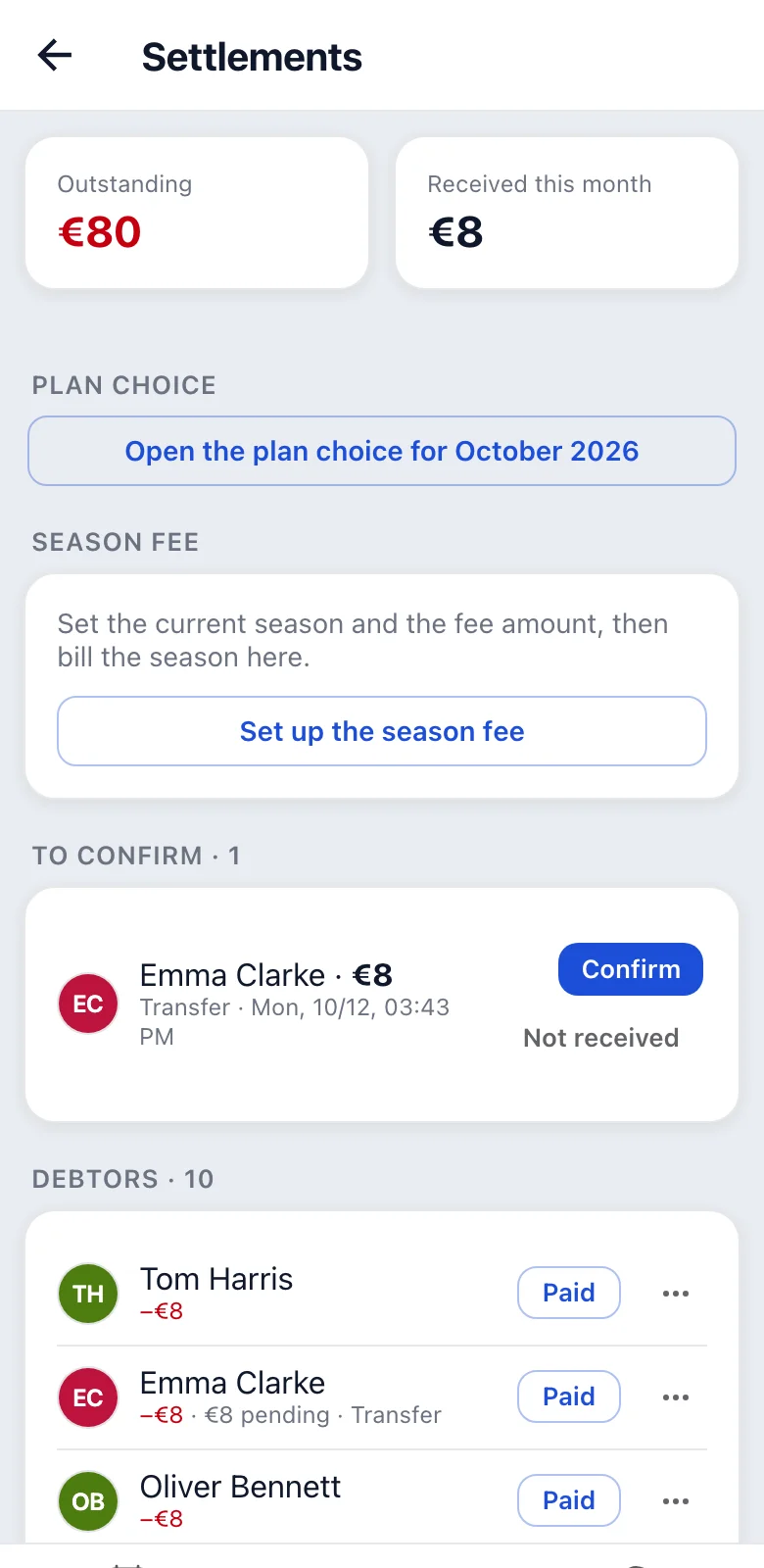
“Season fee”: the current season and the suggested fee, how many members are already billed (e.g. “Billed: 18 of 24 people, 3,600 zł in total”) and “Bill the season…” (Season fee). Without a current season the panel leads you to “Prices and plans”, where you set it.
“Charge for everyone”: “Charge several members…”, one charge with a description to several people at once (e.g. 10 zł each for jerseys).
To confirm
Payments reported by members. You check the statement and tap “Confirm” or “Not received” (with a reason; the member sees it). While a payment waits longer than two days, the treasurers and admins get a reminder every day at 9:00.
The app has no access to the bank and never confirms by itself. Confirm a payment only once you see it on the statement.
After “Not received”:
- it cannot be undone,
- the balance does not change (the reported payment did not change it),
- the member gets a notification,
- with soft blocking the block comes back (Blocking for debt).
If you rejected a payment by mistake, record it with “Paid”.
Debtors
- A list with balances; with more than 10 people, “Search by name” above it narrows it down.
- A reported payment shows the amount and how the person paid (e.g. “50 zł pending · Transfer”).
- “Paid” is for someone who paid by transfer but did not report it in the app: one tap records a transfer for the missing amount right away. “Cancel” appears briefly at the bottom in case it was a mistake.
- Cash, BLIK or another amount: “…” next to it.
- Below the list is a bulk reminder (the app asks whether you are sure first). People with a payment waiting for confirmation do not get the reminder.
- On every member's page you record a payment with “Add a payment”. There every confirmed payment also has “Cancel”; the history then keeps a “Payment correction”.
A guest someone brought to a training is under Debtors with a “Guest” badge and the name of whoever added them. A guest pays for their own trainings. They cannot be reminded (they have no app), so tell whoever brought them.
A former member who still owes (they left or an admin removed them) stays under Debtors with a “Former member” badge and counts in “Outstanding”. They get no reminders; record their payment with “Paid” or “…” as for anyone else.
When someone comes back, their answers to the trainings from their earlier time in the team show again among who signed up, in their history and in the statistics.
Blocking for debt
In the team settings, section “Blocking sign-ups for debt” (both the treasurer and the admin can set it), you choose whether a debtor can sign up for a training:
| Blocking | What happens |
|---|---|
| Off | Debtors sign up normally; they see a warning and are on the debtors list. |
| Soft | A debtor cannot sign up until they report a payment (“I paid” unblocks at once). |
| Hard | A debtor cannot sign up until you confirm their payment. |
Tolerated debt: a debt up to this amount does not block. Empty or 0 means that any debt blocks.
Blocking only prevents signing up. Opting out is always possible, and an admin can sign a debtor up themselves. If you reject a reported payment with soft blocking (“Not received”), the block comes back.
Cash in the locker room
From the start of a training its details have a “Cash in the locker room” button:
- a list of those signed up (and after attendance is closed, those present),
- one tap on a name = paid the amount this person pays for this training,
- another amount (e.g. someone pays off a debt): the “…” button next to the name,
- a counter at the top shows how much you have collected,
- the member gets a notification right away; that is their receipt.
- whoever already reported the cash in the app shows “reported in the app” by their name: the tap confirms that report, no second payment is made.
- “Mark everyone” above the list marks everyone who has not paid yet at once, after a question with the number of people and the total.
People on a monthly subscription and those playing for free show “—” instead of an amount. This also applies to someone who has used up their pack, even though the app charges them for this training. If such a person gives you cash, record it with “…” next to their name.
Made a mistake? Tap the ticked name again and the payment is cancelled (a correction stays in the history). “Undo: {name}” below the list takes back the last tap. With a weak signal the app retries sending by itself, and a double tap does not create two payments. With no signal the tap is not saved, and the app shows that clearly.
You usually collect cash before attendance is closed, so for a while the member has an overpayment, and the totals “jump” when attendance is closed. That is normal.